DevHub for Tessitura
The developer workbench for Tessitura: explore the full API, run real calls safely, get expert help from an AI that knows Tessitura, and turn what works into code, APIs and AI tools.
Everything a Tessitura developer needs, in one place.
Tessitura's REST API opens your box office, fundraising and memberships to every website, app, kiosk and chatbot you build. DevHub makes all of it easier to learn, easier to try and easier to build on.
It's a hosted workbench where your developers browse every method with practical tips beside it, run calls on a built-in demo venue or your own Tessitura, ask an assistant that knows Tessitura inside out, and turn what works into code, APIs and AI tools.
- 76Tessitura methods, ready to run
- 213REST routes mapped to their methods
- 5languages of take-away code
- 3environments, always labelled
- 0secrets ever shown back, to anyone
From first question to live integration.
DevHub follows the way integrations are really built. Each step lives in a project, so the whole team picks up where anyone left off.
- 01
Explore
Every method by task, the records it returns, and 213 Tessitura REST routes, with practical tips beside them.
- 02
Run
Try every call on the built-in demo venue, then on your own Test and Production Tessitura.
- 03
Ask
Plan, explain and debug with an AI assistant grounded in Tessitura itself.
- 04
Capture
Sessions, processes and notes, shared in each project so the team never starts from zero.
- 05
Build
Take away code in five languages, or design no-code flows that chain calls into one answer.
- 06
Ship
Publish your work as functions, served over the Relay API and MCP servers for AI tools.
Practise on the demo venue. Go live with confidence.
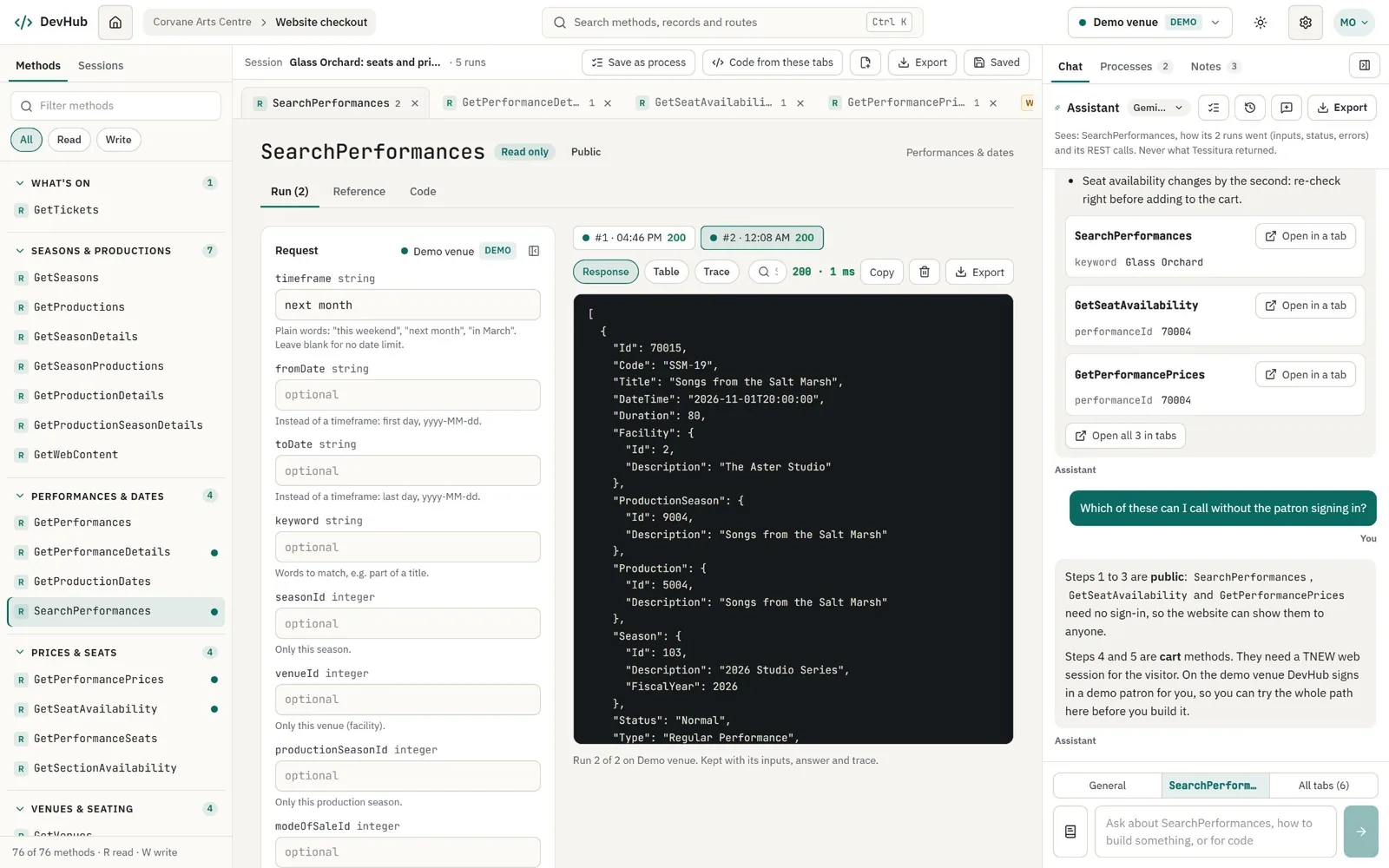
Open methods side by side, fill in their inputs and run them. A screenshot can never leave anyone wondering where a result came from, and changing data always takes a deliberate step.
- A built-in, fictional demo venue in every project: seasons, shows, prices and packages, with dates that are always upcoming and carts that really fill
- DEMO, TEST and PROD colours on every call, from the picker to the Run button
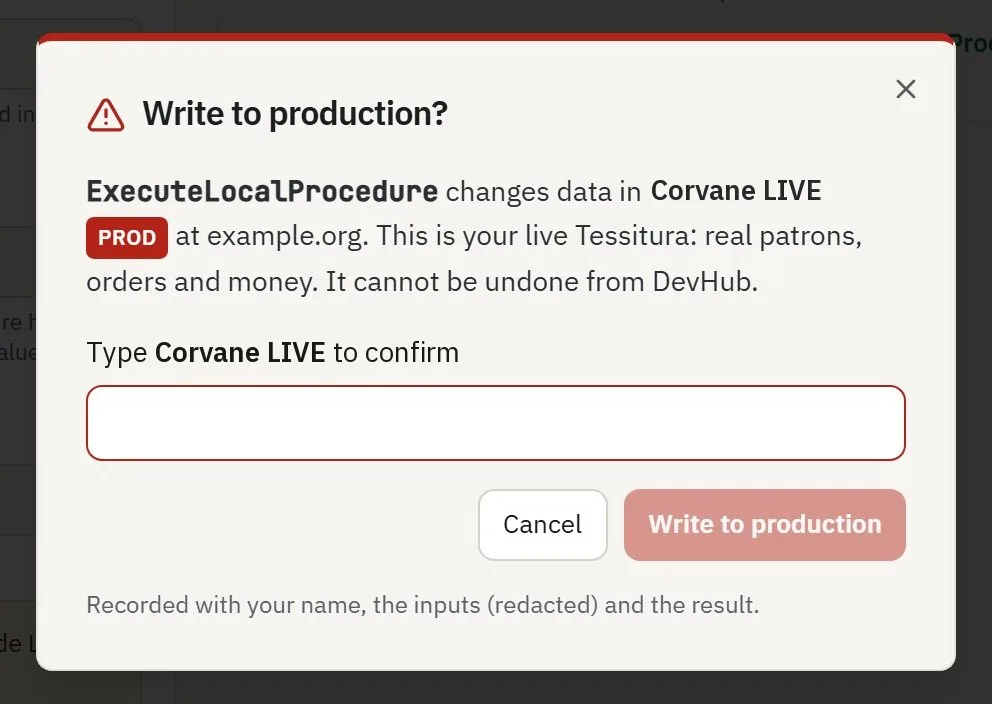
- Real logins start read-only; every write is confirmed, and production needs the right role and the connection's name typed in
- Each run kept with its inputs, answer, timing and redacted HTTP trace
An assistant that knows Tessitura inside out.
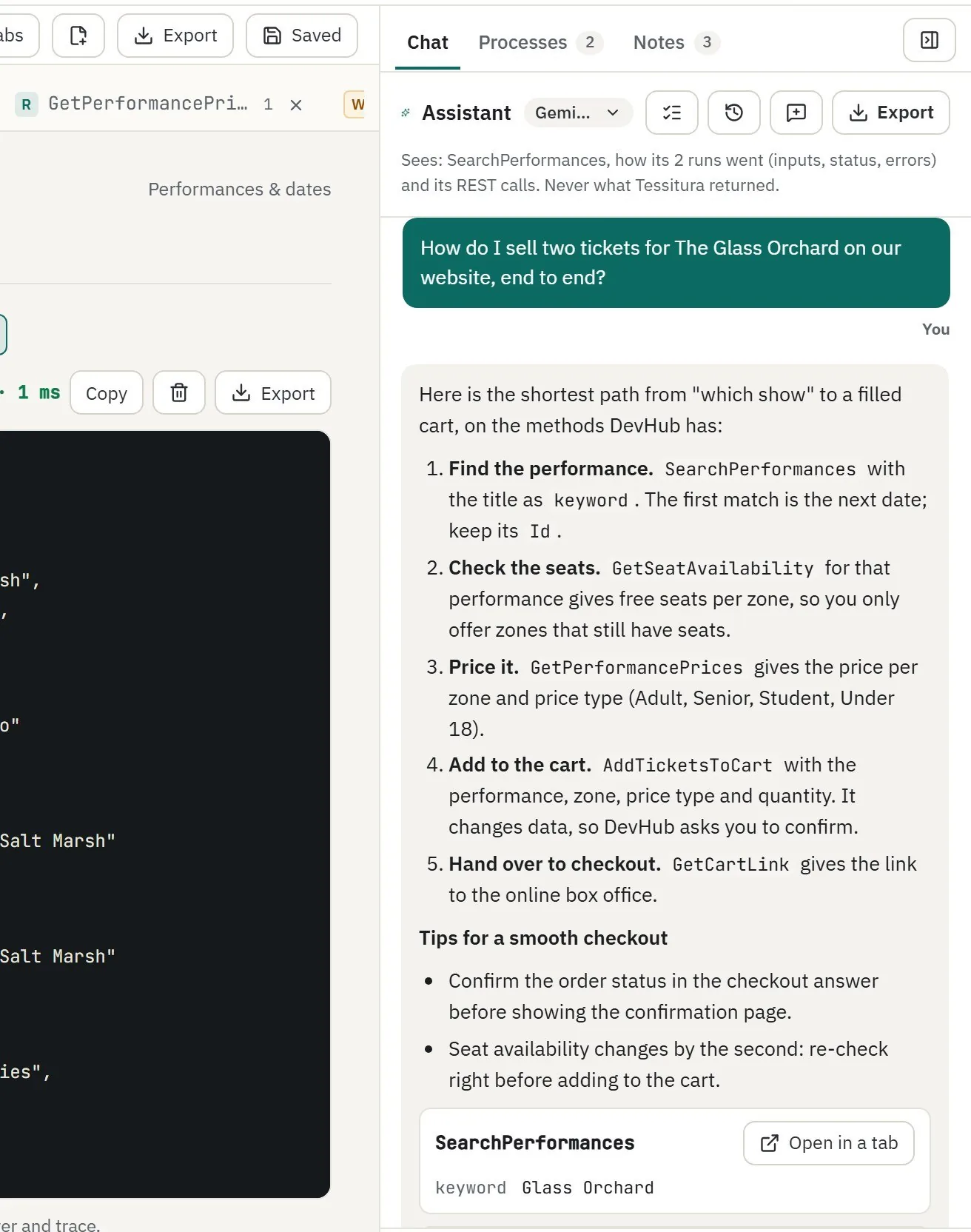
Ask “how do I…”, “why did this fail?” or “write me the code”. Its answers point to methods and fields that really exist.
- Looks up the real methods, record shapes, routes and tips before it answers
- Suggests calls as “Open in a tab” cards with the inputs filled in; nothing runs until you press Run
- Explains failed runs in plain words, and what to check first
- Never sees your data: Tessitura answers reach it only as a shape, like “a list of 12 items”
- Google Gemini included, or your own Google Cloud key on packages that allow it
Working code in five languages.
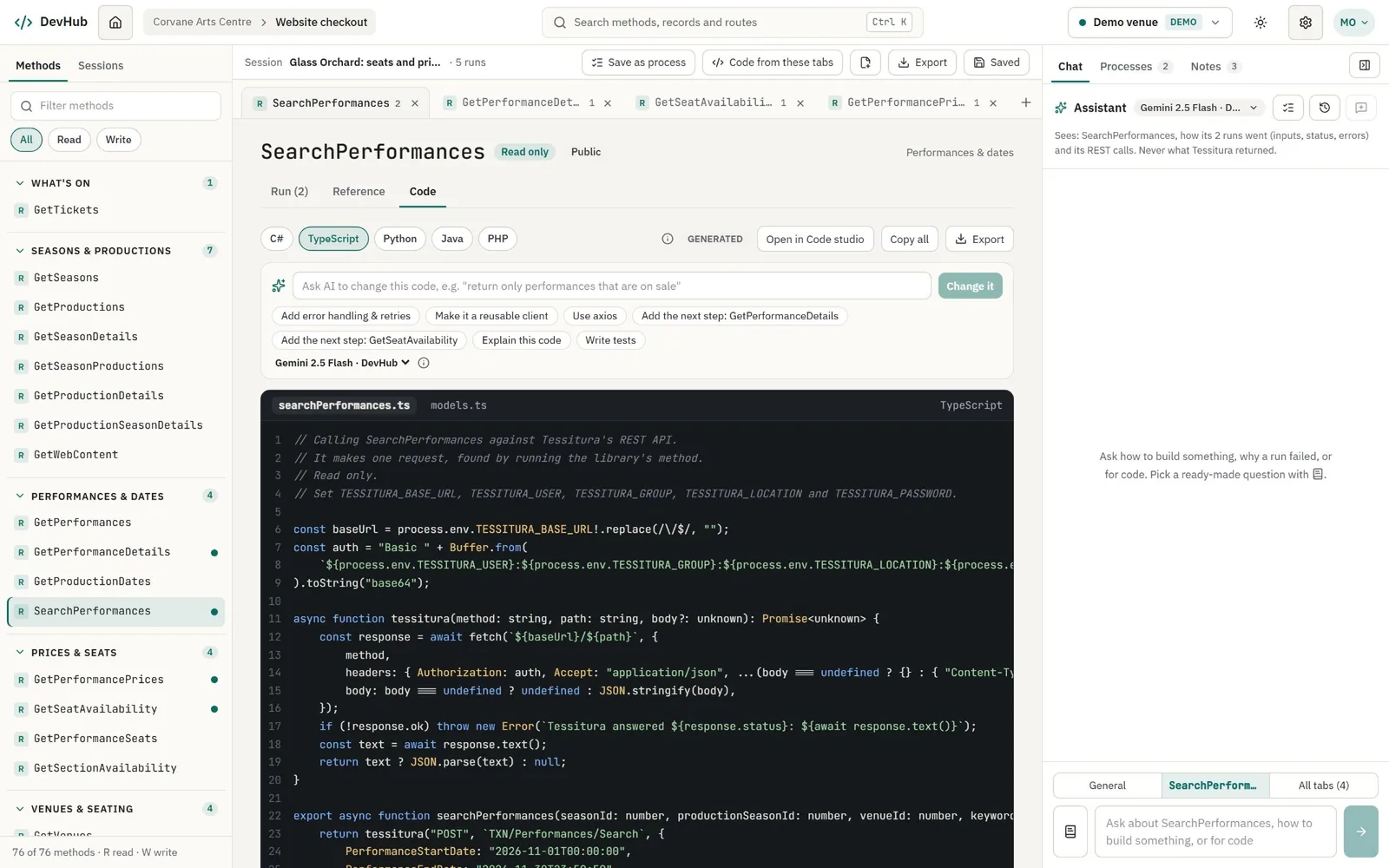
The Code tab writes calling code and typed models for any method, instantly and with no AI, from the actual requests DevHub makes. You copy it or download it and build where you always build.
- C#, TypeScript, Python, Java and PHP, made from the real REST calls
- Logins come from environment variables, never from the code
- Ask the AI for retries, a reusable client or tests, and keep the diff you like
- Code studio writes multi-file projects with a README, ready to download
- The code calls Tessitura directly and never needs DevHub
Your work, as APIs and AI tools.
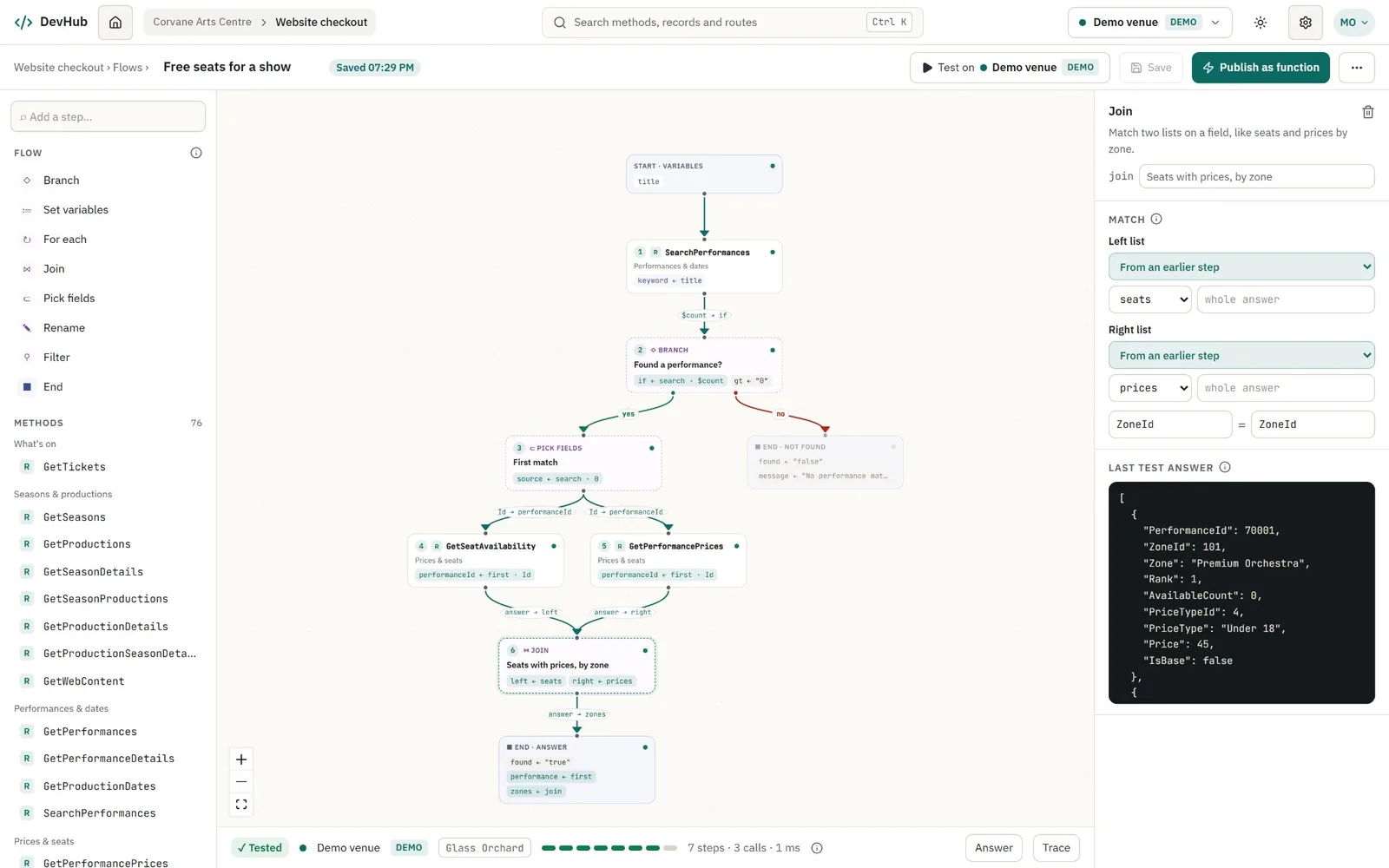
Anything your team works out in DevHub can become a service, with no extra code and nothing separate to deploy. Find a show, get its free seats and prices, and join them by zone: draw it once as a flow, and publish it as a function anyone can call.
- 01
Save a process
“Save as process” turns your open tabs into documented steps, recording which answer feeds which input.
- 02
Make it a flow
The steps open in the flow designer. Add branches, joins and filters, then test it on demo, test or production.
- 03
Publish a function
Choose the inputs and the answer's fields. Every publish is a new version, so callers pinned to v1 keep working.
- 04
Use it everywhere
Call it from your systems over the Relay API, and tick it as a tool on any MCP server for Claude, Cursor and other AI tools.
The Relay API.
Websites, apps, kiosks and Postman call your project's functions with an API key.
POST /relay/v1/functions/free-seats-for-a-show
Authorization: Bearer dvh_live_…

{ "title": "The Glass Orchard" }

→ { "function": "free-seats-for-a-show", "version": 1,
    "answer": { "found": "true",
                "performance": { … },
                "zones": [ … seats with prices … ] },
"calls": 3 }- One clean call replaces a chain of Tessitura requests
- Keys limited by environment, function, IP range, rate and expiry
- An OpenAPI document for each key, ready for Postman
- A ledger of every outside call, never the inputs or the answers
MCP servers for AI.
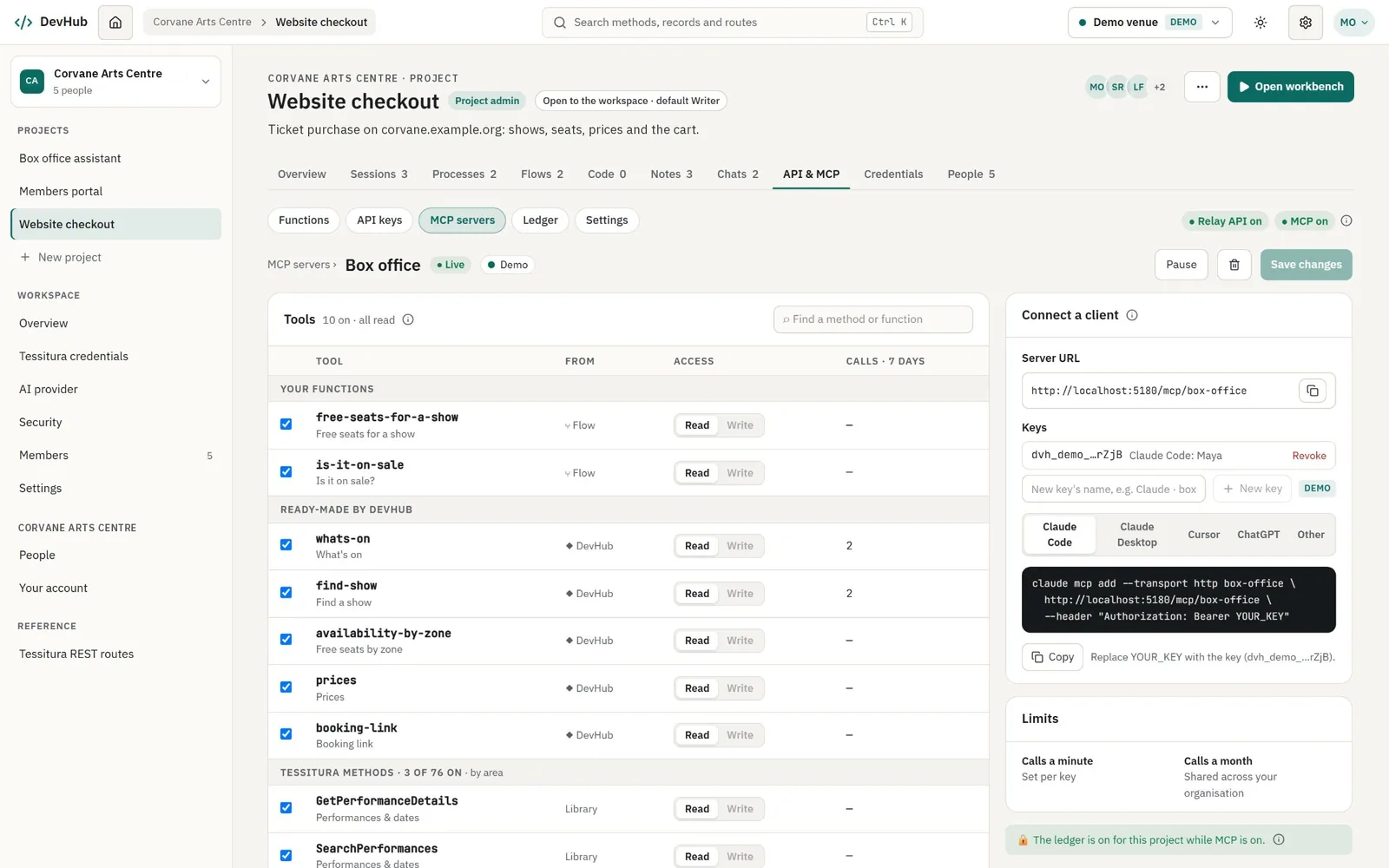
Give Claude, Cursor and other AI tools safe, hosted Tessitura tools: your own functions, DevHub's ready-made ones such as what's on and seats by zone, or individual methods. Every tool is read-only, and each carries the library's practical tips so the model uses it well from the first call.
Your Tessitura logins, sealed.
DevHub holds the keys to box offices, so it's built like it. These are commitments, not settings.
Logins sealed
Each Tessitura login is encrypted with its own key, and secrets are write-only: no screen, export or person, our staff included, can read one back.
Code never runs in DevHub
No script steps, no run console, no online IDE. Flows are data that DevHub carries out, within built-in limits that protect the venue's server.
Tessitura data passes through
The Relay API and MCP servers store no answers, and the ledger never keeps inputs or answers.
The AI never sees results
Only the shape of an answer, and never a login.
Demo and live never mix
Every set of calls is all demo or all live, so a demo can never reach a real Tessitura.
Everything is audited
Runs, writes, sign-ins, logins, keys, publishes and exports, with inputs and traces redacted before they are stored.
For everyone who builds on Tessitura.
Integration agencies
Building websites, apps and data feeds for several Tessitura clients, each in its own workspace.
In-house developers
At performing arts centres, orchestras, opera companies, theatres and museums.
Support & box office technologists
Who want to understand a call and what a record holds, without writing code.
Teams building with AI
Who want an assistant, chatbot or agent to answer from Tessitura safely, through tools they control.
Start on the demo venue, grow into production.
Every organization starts with a trial that can do everything on the demo venue. Packages then set which features are included and how much can be used each month, tailored to you.
Trial
For evaluating DevHub.
- Everything on the demo venue
- Your test Tessitura
- Modest assistant use
Team
For a development team working on test and production.
- Production logins
- A workspace key only you hold
- Room for the whole team
Enterprise
Everything, with limits tailored to you.
- Your own AI keys
- No set limits
- Seats by agreement
The flow designer, functions, the Relay API and MCP servers are switched on per package. Package contents are confirmed in your proposal.
See it for yourself.
Request a demo sandbox: we'll email you a sign-in link, and it's yours for 7 days.
More for Tessitura.
MCP Servers for Tessitura
Need an MCP server designed, built and run for you, with sign-in and write access? We build those too.
ExploreAI Chatbot for Tessitura
A box office assistant for your patrons, answering with live Tessitura data.
ExploreCustom Websites for Tessitura
Rather we built it? Websites coded in .NET, React and Next.js on the Tessitura API.
ExploreReady to get started?
Let's talk.
Whether it's AI on your Tessitura data, a website redesign, getting found in AI search, or custom software, we'd love to hear about it. Consultations are free, and we typically reply within 24 hours.
Thank you, we'll be in touch.
We typically reply within 24 hours, from info@digitalartsmediaservices.com.
- Phone
- +1 (202) 800-0207
- Office
- 2021 L St. NW, Suite 101-341
Washington, DC 20036 - What to expect
- Free consultation · Custom solutions · Ongoing support