Key takeaways
- AI is most useful to arts fundraisers as a drafting and research assistant that works from your own program data, not as a writer that invents your story.
- The biggest risks are made-up facts and figures, a generic voice that funders can spot, funder rules about AI use, and donor data shared with the wrong tools.
- A simple workflow of gather, draft, verify, edit in your voice and approve keeps a person responsible for everything that goes out.
- Prospect research with AI should stay within public, relevant information and your organization's own policies, the same standard you apply to research done by hand.
AI can save arts fundraisers real time on grant writing and donor research, as long as you use it as a drafting and research assistant rather than an author. It works best when you feed it your own program data and the funder’s questions, ask it for a first draft, and then have a person verify every fact and edit it into your organization’s voice before anything goes out.
That sounds simple, and mostly it is. The difference between AI that helps a development team and AI that embarrasses one comes down to what you give it, what you let it decide, and who checks the result. This guide covers where AI is genuinely useful, where it tends to fail, and a workflow that keeps your team in charge.
What can AI actually do for a development team?
Most of a development officer’s week is not spent on the brilliant opening paragraph. It is spent reshaping the same information for different audiences, formats and word counts. That is exactly the kind of work today’s AI models handle well.
Useful jobs include:
- First drafts from your own material. Give the AI your program descriptions, last season’s outcomes, your mission statement and the funder’s questions, and ask for a draft that answers each question in order.
- Reformatting for each funder. The same program story often needs to fit a 250-word limit for one foundation and a three-page narrative for another. AI is good at condensing, expanding and reorganizing text you already trust.
- Grant reports. When the numbers and stories already exist in your program records, AI can turn them into a readable report structured around the funder’s reporting template.
- Donor briefing prep. Before a meeting, AI can summarize what you already know about a donor from your own notes, plus relevant public information, into a one-page brief.
- Acknowledgment letter drafts. AI can draft personal-sounding thank-you letters that reference the gift and the program it supports, for a staff member to review and sign.
- Prospect list summaries. Given a list of prospects and their public profiles, AI can sort, summarize and flag which ones look most aligned with a specific program.
In each case, the AI is working with information you provide or can verify. That is the key to using it well.
Where does AI go wrong in grant writing?
AI language models are designed to produce fluent, plausible text. Plausible is not the same as true, and in fundraising that gap matters.
| Risk | What it looks like | How to prevent it |
|---|---|---|
| Made-up facts | Attendance figures, outcomes or partner names that sound right but never happened | Only let the AI use numbers you supply, and check every figure against your records |
| Invented quotes and sources | A “participant quote” or a cited study that does not exist | Never publish a quote or citation you cannot trace to its source |
| Generic voice | Text full of phrases like “transformative impact” that could describe any organization | Give the AI samples of your best past writing and edit for specifics |
| Funder rules | Some funders have policies on AI-generated content | Read each funder’s guidelines, and ask when in doubt |
| Data privacy | Donor names, giving history or notes pasted into consumer AI tools | Use approved business AI tools and share only what a task needs |
The first risk deserves extra attention. If you ask an AI to “write about the impact of our education program” without giving it any data, it may fill the gaps with confident numbers. A reviewer at a foundation who knows your organization may notice. Worse, you may not.
What does a safe AI grant writing workflow look like?
A good workflow keeps a person responsible at every stage where judgment matters. Here is one that works for small teams:
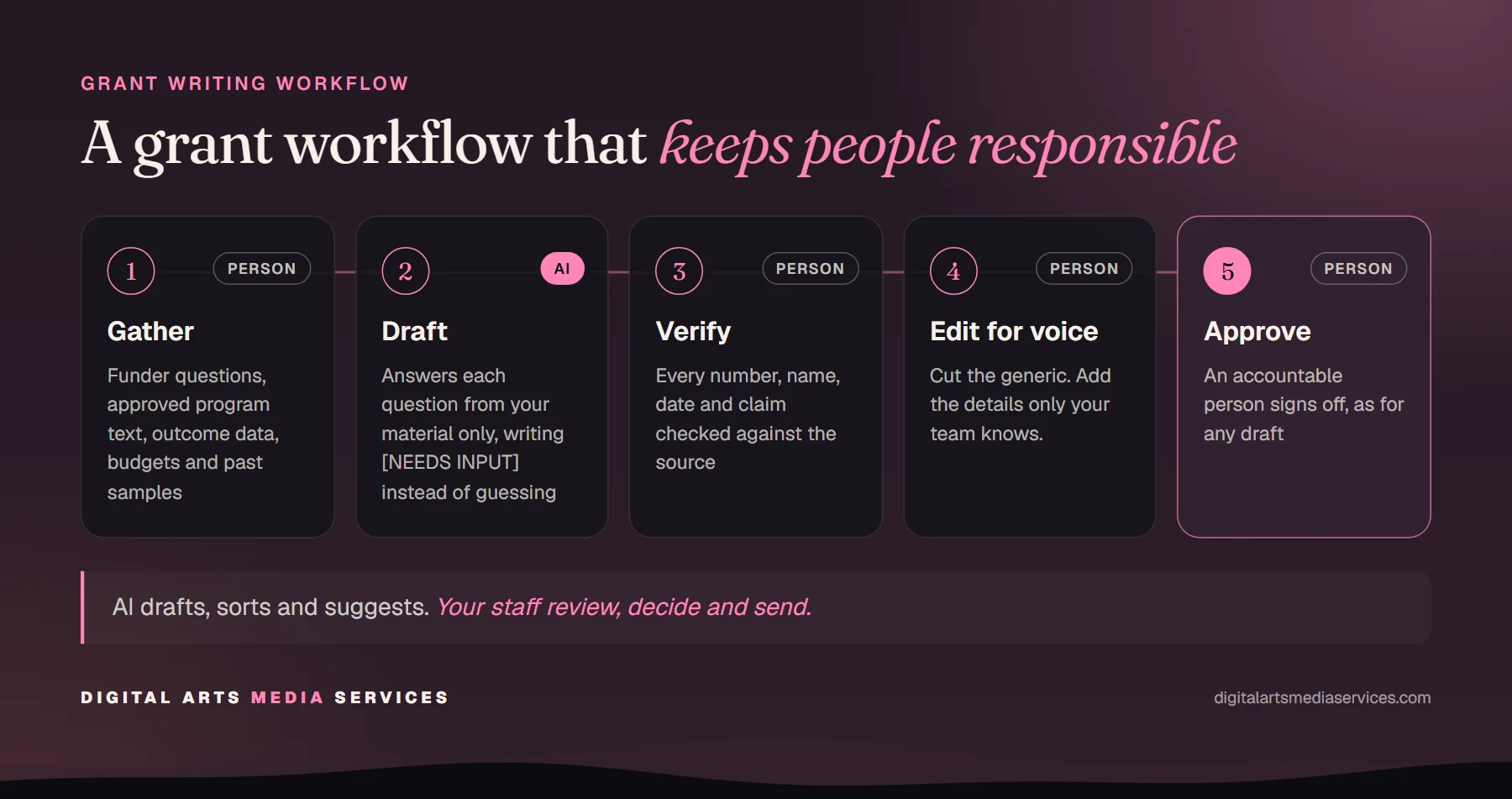
- Gather. Collect the funder’s guidelines and questions, your approved program descriptions, current outcome data and budget figures, and two or three samples of past applications you are proud of.
- Draft. Ask the AI to answer each question using only the material provided, and to mark any place where it needs information it does not have instead of guessing.
- Verify. A staff member checks every number, name, date and claim against the source material. Anything that cannot be traced gets cut or confirmed.
- Edit for voice. Rewrite the parts that sound generic. Add the specific details only your team knows: the student who came back as a teaching artist, the community partner who made a program possible.
- Approve. The development director or another accountable person signs off, exactly as they would for a draft written entirely by hand.
This is the same principle behind the AI agents we build for arts organizations: the AI drafts, sorts and suggests, and your staff review, decide and send.
How should you structure prompts for grant drafts?
You do not need clever prompt tricks. You need clear instructions and good inputs. A few habits make a big difference:
- State the role and the audience. “You are helping the development team of a mid-sized orchestra draft a response to a community foundation’s arts education grant.”
- Paste the funder’s exact questions and word limits, and ask for answers in the same order.
- Provide the facts as a separate block labeled as the only allowed source for numbers and claims.
- Ask for gaps, not guesses. “If you need information that is not provided, write [NEEDS INPUT] instead of inventing it.”
- Show your voice. Include a short sample of past writing and ask the AI to match its tone and plain language.
- Iterate in small steps. Ask for one section at a time, then refine, rather than requesting the full application in one go.
Teams that use AI regularly often save these instructions as a shared template, so every draft starts from the same rules. If you are writing your organization’s guidelines for this, our post on writing an AI policy for your arts nonprofit covers what to include.
How can AI help with donor research without crossing ethical lines?
Prospect research has always involved judgment about what is appropriate to know. AI does not change those standards. It just makes it faster to gather information, which makes the standards more important.
Good practice looks like this:
- Stick to public, relevant information. Public records of past giving, board and volunteer roles, published interviews about causes a person cares about, and their history with your organization.
- Leave out what is not relevant. Personal matters, family details and anything that has nothing to do with a philanthropic relationship do not belong in a briefing.
- Verify before you rely on it. AI tools can mix up people with similar names or state outdated information as current. Check key facts against original sources.
- Follow your own policy. Many development teams already have a prospect research policy. Apply it to AI-assisted research in the same way.
- Use the “would I show them” test. If you would be uncomfortable if the donor read the briefing, scale it back.
Donors give because they trust your organization. Research that feels intrusive can damage that trust far more than any time it saves.
What about donor data and privacy?
Your donor database holds some of the most sensitive information your organization has. Before connecting AI to it, or pasting anything from it into a chat window, check a few things:
- Is the AI tool on a business or enterprise plan your organization has approved?
- Does the provider’s agreement say whether your data may be used to train models?
- Are you sharing only the fields the task needs, rather than whole records?
- Is there a record of who used which tool and for what?
For many teams, the safest start is to work from summaries and anonymized data, and to bring in a properly configured integration later. When AI does connect directly to a CRM, it should use role-based access and log every action, which is how we approach AI for Tessitura and other systems. Our privacy and security checklist for AI with Tessitura data goes into more detail, and most of it applies to any donor database.
Where should a small development team start?
Pick one task that repeats, has clear source material and carries low risk if a draft needs heavy editing. Good candidates:
- Annual grant reports, because the facts already exist and the format repeats.
- Acknowledgment letters, because a staff member reviews each one anyway.
- Meeting briefings, because they are internal and easy to check.
Try it for a month, note the time saved and the quality of the drafts, and adjust your instructions. Once the team is comfortable, consider automations that pull program data into a report template automatically, so the AI always starts from current numbers. For a broader look at where AI fits across your organization, see our practical guide to AI for arts organizations.
Want help setting it up?
We help arts organizations put AI to work on grant drafts, reports and donor briefings, with your data protected and your team in charge of every word. If you would like to talk through where it could save your development team time, book a free consultation. We typically reply within 24 hours.
Frequently asked questions
Can AI write a grant application for an arts organization?
AI can write a solid first draft if you give it your own material: program descriptions, outcomes, budgets and the funder's questions. It should not be trusted to supply facts, numbers or quotes on its own. Treat the draft as a starting point that a development staff member checks, edits and approves.
Do funders allow grant applications written with AI?
Policies vary by funder, and some have started to publish guidance on AI use. Read each funder's guidelines and, if they are silent, consider asking your program officer. Whatever the policy, your organization remains responsible for every statement in the application.
Is it safe to put donor information into ChatGPT or other AI tools?
Only if the tool is set up for it. Use business or enterprise AI plans your organization has approved, check whether your data may be used to train models, and share only the fields a task needs. Many organizations keep detailed donor records out of AI tools entirely and work from summaries.
How can AI help with donor research ethically?
Limit research to public information that is relevant to a philanthropic relationship, such as past public giving, board service and stated interests. Verify anything AI finds against original sources, and follow your organization's prospect research policy. If you would not be comfortable showing the donor the briefing, it probably goes too far.
What is the best first AI project for a small development team?
Grant reports are often a good start because the facts already exist in your program data and the format repeats every year. Acknowledgment letter drafts and meeting briefings are other low-risk options. Start with one task, measure the time saved, and build from there.